 Wojciech Seweryn
Start with an analysis, not with packages
It is easy to start a major upgrade in the most direct way: open the project file, bump package versions, run dotnet restore, and wait for the first set of errors. Usually, it’s not such a bad thing, but…
For Optimizely CMS 13, that is not where I would begin.
The upgrade guide starts with checking the solution before changing packages or code… and that is probably the most important takeaway: check the ground before you touch NuGet.
CMS 13 changes the platform baseline, search assumptions, Graph integration, service registration, identity setup, and removes several older CMS features.
My order would be simple: first identify the risky areas, then update the packages.
Pre-upgrade checklist
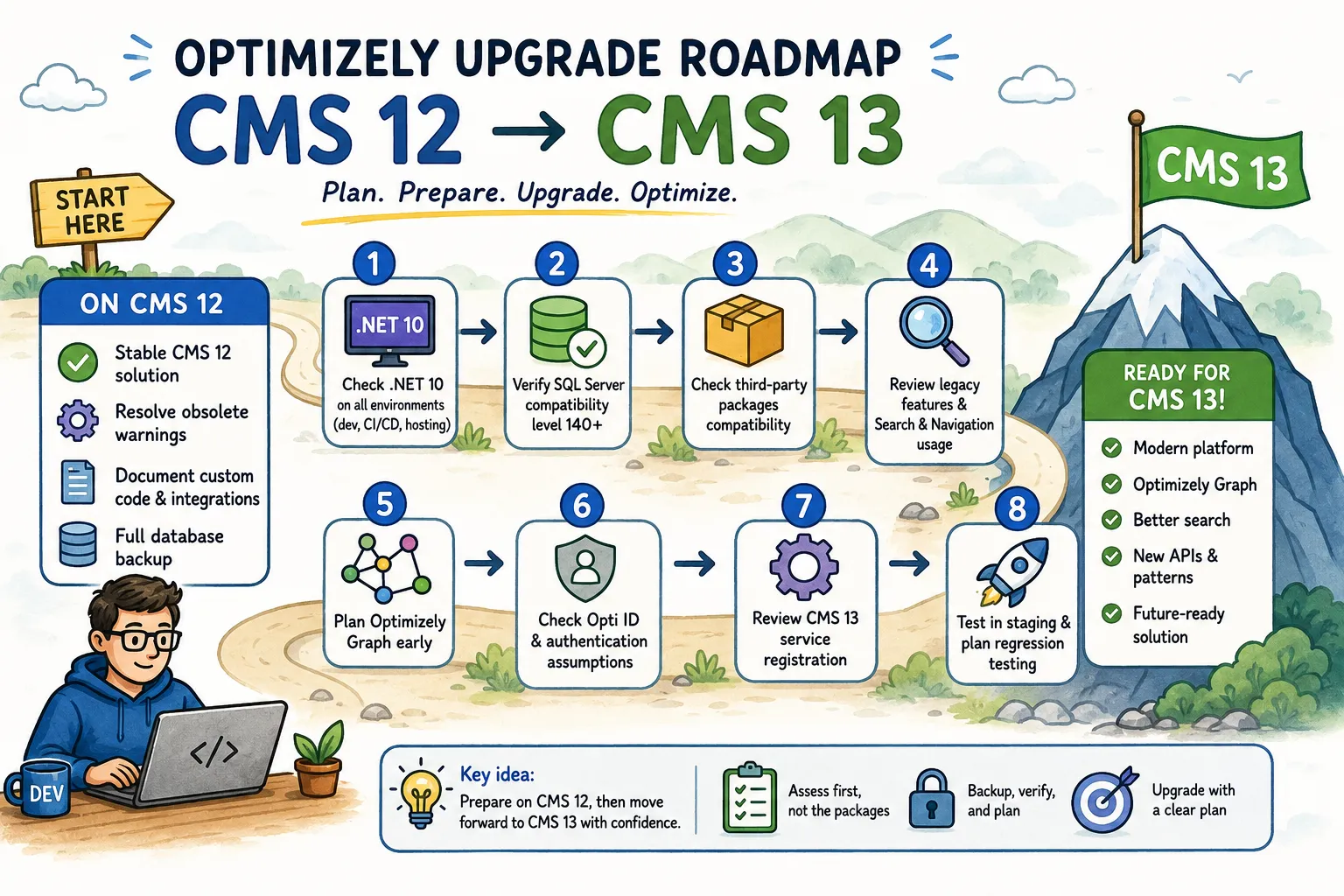
Before changing the CMS packages, I would go through this list:
- Confirm that the solution already runs on CMS 12.
- Check .NET 10 on developer machines, build agents, and hosting.
- Create a full CMS database backup.
- Check SQL Server database compatibility level.
- Check third-party packages.
- Resolve obsolete warnings while still on CMS 12.
- Document custom code, for example jobs, content types, initialization modules, and integrations.
- Check removed legacy features.
- Check Search & Navigation /
EpiServer.Findusage. - Plan Optimizely Graph work early.
- If migrating search, run Graph and Search & Navigation in parallel first.
- Check Opti ID and authentication assumptions.
- Review CMS 13 service registration.
- Test in staging and plan regression testing after the build is green.
Feel free to use this checklist to track your own upgrade progress (checkboxes are interactive).
1. Confirm that the solution already runs on CMS 12
The CMS 13 upgrade path starts from an existing CMS 12 solution.
So the first checkpoint is simple, but still worth saying out loud.
- the application should already run on CMS 12,
- the CMS 12 build should be stable,
- known CMS 12 issues should not be mixed with CMS 13 upgrade issues.
If the project still has old migration leftovers or unresolved CMS 12 warnings, I would clean those up first. Otherwise you end up debugging two upgrades at the same time.
2. Check .NET 10 in your environments
CMS 13 requires .NET 10. If the machine uses an earlier .NET version, CMS 13 packages can fail during dotnet restore.
This is not just a .csproj change.
I would check:
- local developer machines,
- build agents,
- Docker base images,
- CI/CD pipeline steps,
- hosting assumptions.
This check can save a lot of wasted debugging. If one environment is still on an older .NET version, the first failure may come from the toolchain before your Optimizely code even starts to matter.
3. Create a full database backup
The pre-upgrade prerequisites include a full CMS database backup before starting.
This is one of those steps where I’d rather overprepare than have to explain everything later if something goes wrong.
Before the upgrade, I would make sure the team knows:
- which database is being upgraded,
- where the backup is stored,
- how restore would work,
- who owns the rollback decision.
A CMS upgrade is not only a compile-time exercise. If content, schema, scheduled jobs, or add-ons are affected, rollback has to be something the team can actually execute. A rollback plan will give you peace of mind in case something goes wrong; under stress, you don’t make the best decisions.
4. Check SQL Server database compatibility level
CMS 13 requires SQL Server database compatibility level 140 or higher.
This is easy to miss when everyone is looking at C# errors. In newer cloud-hosted databases it may already be fine. In older on-premises setups, I would check it directly before the package update.
5. Check third-party packages
Third-party package compatibility can be the single largest area of effort during a CMS 13 upgrade.
I would review this before touching the Optimizely packages.
Before updating Optimizely packages, I would go through every non-Optimizely package and check:
- whether a CMS 13-compatible version exists,
- whether it supports .NET 10,
- whether removing it break dependencies on other packages,
- whether it leaves content types or data behind,
- whether it needs explicit service registration in CMS 13.
Small CMS helper packages can become real upgrade blockers if they are not ready.
6. Resolve obsolete warnings before the upgrade
CMS 13 removes APIs marked as [Obsolete] in CMS 12. I would resolve obsolete warnings before upgrading.
I prefer doing this while the project is still on CMS 12:
- build the CMS 12 solution,
- review obsolete warnings,
- replace obsolete API usage,
- optionally enable
<TreatWarningsAsErrors>true</TreatWarningsAsErrors>to catch them early.
This keeps the cleanup separate from framework, package, Graph, and service registration changes.
7. Document custom code before changing packages
Before changing packages, I would also write down the custom code that can be affected by the upgrade. The usual risky areas include:
- custom scheduled jobs,
- initialization modules and startup ordering assumptions,
- custom content types and property definitions,
- custom editors, modules or admin plugins,
- integrations with DAM, PIM, CRM, ERP, search, analytics or external APIs,
- background services
- any customs or modifications you’ve made to the default solution that are only known to YOU
The goal is not a perfect internal document. The goal is to know where the compiler will not tell the full story.
8. Check removed legacy features
CMS 13 removes legacy features that were deprecated in CMS 12:
- Dynamic Properties,
- Mirroring,
- the legacy Plugin system.
I would also check for old code and database artifacts around these features, including:
- related classes,
- interfaces,
- stored procedures,
- database tables
- export/import APIs.
In older solutions, I would check for this explicitly. These features often hide in admin tools, migration helpers, scheduled jobs or old plugin code.
9. Check Search & Navigation usage
This is another major architectural checkpoint in the whole upgrade process.
Search & Navigation, including EpiServer.Find, is not supported in CMS 13. For search, the expected direction is Optimizely Graph OR your own search provider.
I would review all Search & Navigation usage in the solution before the upgrade, not after the build starts failing.
Typical places to check:
- page search endpoints,
- listing and filtering services,
- autocomplete,
- best bets,
- boosting,
- scheduled indexing jobs,
- editorial or admin workflows based on Search & Navigation.
Search usually spreads through a solution in small practical ways. That is why I would handle it separately during the upgrade.
10. Plan Graph as part of CMS 13 readiness
Graph should be part of the upgrade plan from the beginning.
Optimizely Graph and Opti ID are part of CMS 13 preparation. A new CMS instance also has to communicate with the Graph service, and Graph integration is built into CMS 13.
For the checklist, I would include:
- enabling or provisioning Graph where needed,
- reviewing existing Graph queries,
- checking CMS 12 vs CMS 13 Graph schema differences,
- planning search behavior validation,
- checking Graph-related service registration.
One practical detail is easy to miss: if you register Content Manager, AddContentGraph() must be registered before AddContentManager().
11. Do not remove Search & Navigation first
If the project is moving from Search & Navigation to Graph, use a controlled, parallel approach:
- Install and configure Graph.
- Run Graph alongside Search & Navigation.
- Validate search behavior and performance.
- Switch production traffic when results meet expectations.
- Keep Search & Navigation available as a fallback until Graph is fully verified.
This is the approach I would use for this kind of migration.
Search quality is not only about compiling code. It is about relevance, filtering, performance, editor expectations, and confidence in production.
There is also a product gap worth calling out: Graph does not provide the same web-based admin UI or built-in analytics and reporting dashboard known from Search & Navigation. If the business uses those workflows today, they need a separate plan.
12. Check Opti ID assumptions
Opti ID needs its own checkpoint, especially for CMS 13 instances hosted on DXP.
For Opti ID, the setup starts with EPiServer.OptimizelyIdentity and services.AddOptimizelyIdentity().
Opti ID automatically maps the virtual roles CmsEditors and CmsAdmins, so existing mappings for those roles must be removed. If the project is not using ASP.NET Identity, calls to services.AddCmsAspNetIdentity<TUser>() must also be removed.
This is where I would review:
- custom login behavior,
- ASP.NET Identity customization,
- custom virtual role mappings,
- multiple authentication schemes,
- SSO requirements,
- local development assumptions around edit and admin access.
One detail that is easy to miss: Opti ID is enabled by default for protected shell modules, preview, and edit mode only. Using it as the default authentication scheme for the whole application is an explicit configuration choice.
13. Review service registration
Service registration is another area that deserves a careful review.
If the CMS 12 solution already uses AddCms(), that call continues to work in CMS 13 and remains the recommended approach.
This matters more when the project uses granular service registration. Referenced packages should be registered explicitly or removed. Otherwise the application can fail at startup.
Examples worth checking include:
EPiServer.CMS.UI.AspNetIdentitywithAddCmsAspNetIdentity<ApplicationUser>(),EPiServer.Cms.UI.VisitorGroupswithAddVisitorGroupsMvc()andAddVisitorGroupsUI(),- packages such as TinyMCE that may require their own
Add*()registration.
I would also check namespaces here. The CMS service registration methods require EPiServer.DependencyInjection, not Microsoft.Extensions.DependencyInjection.
14. Test in staging and plan regression testing
The breaking changes checklist is exactly what I would expect here: review the changes, assess the impact, plan refactoring, test in staging, update integrations, run regression testing, and monitor after the upgrade.
Most of these checks become very practical during the actual upgrade.
For CMS 13, I would validate at least:
- build and startup,
- edit mode,
- admin mode,
- authentication and roles,
- scheduled jobs,
- Graph queries,
- search behavior,
- custom editors and shell modules,
- integrations,
- deployment pipeline.
A successful upgrade is more than “the site builds”. Editors need to work. Search needs to return acceptable results. Jobs need to run. Integrations need to keep exchanging data.
Summary
The CMS 13 upgrade should not start with “let’s update the NuGet packages and see what happens.” It should start with a short impact check.
For me, the biggest pre-upgrade questions are:
- Is the environment ready for .NET 10?
- Is the database protected and compatible?
- Which third-party packages are not ready?
- Are obsolete APIs already cleaned up?
- What happens to Search & Navigation?
- Is Graph planned as part of the upgrade?
- Are authentication and Opti ID assumptions clear?
- Do we know what to test beyond compilation?
If those questions already have answers before the upgrade starts, the whole process becomes much easier to manage.
For CMS 13, I would rather spend extra time on preparation than debug avoidable problems halfway through the upgrade.
If you have questions or want to compare this checklist with a real project, leave a comment.
Regards,
Wojtek