 Wojciech Seweryn
CMS 13 means moving to Graph
The CMS 13 upgrade is also a search migration story. If your solution still depends on Search & Navigation patterns, you now need to move that logic to Optimizely Graph.
I want to keep this post practical and code-first, so let’s look at what that change actually means.
What changes in practice
If your codebase uses SearchClient, For(...), Filter(...), FilterForVisitor(), Take(...), and GetContentResult(), that area now needs explicit migration work.
The good part is that CMS 13 comes with a Graph C# SDK, so this is not a pure GraphQL rewrite. At a high level, the API shape is intentionally familiar:
| Search & Navigation | Graph SDK |
|---|---|
Filter() | Where() |
For() | SearchFor() |
Take() | Limit() |
That does not make migration trivial, but it does make it more approachable.
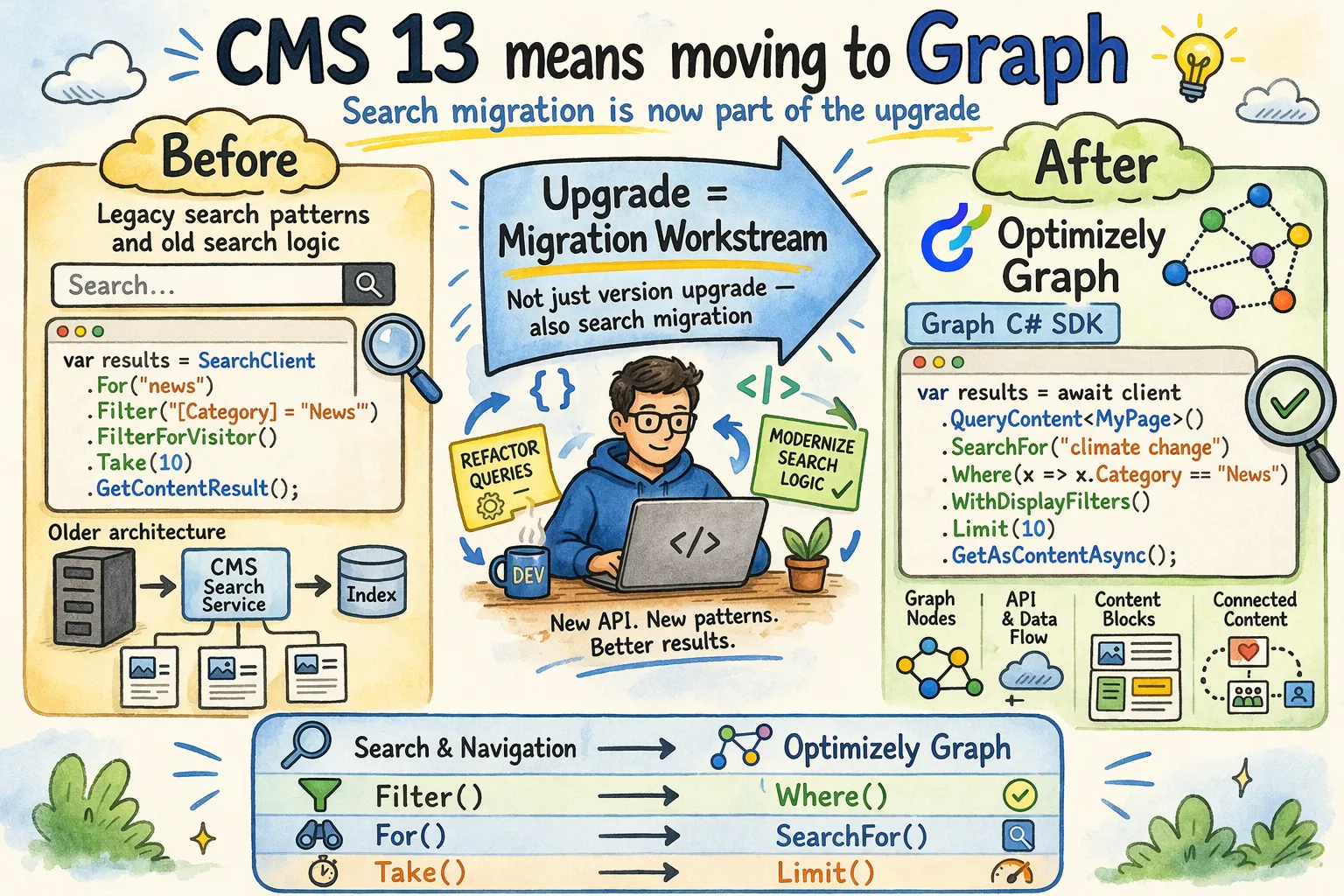
In this post, I will walk through a few examples that show how to migrate typical queries from Search & Navigation to the Graph SDK.
Example setup
Imagine your application is a customer education hub for a B2B SaaS product. The site contains:
HelpArticlePagefor practical product guidesLiveWorkshopPagefor training sessions and webinarsCustomerStoryPagefor customer success stories
Now let us walk through how migration from Search & Navigation to Graph might look inside that application, step by step.
Example 1: simple content search
We can start with something small: search HelpArticlePage content for "graph" and return the first 10 published results.
Search & Navigation
var results = searchClient
    .Search<HelpArticlePage>()
    .For("graph")
    .FilterForVisitor()
    .Take(10)
    .GetContentResult();
Optimizely Graph in CMS 13
var results = await _graphClient
    .QueryContent<HelpArticlePage>()
    .SearchFor("graph")
    .WithDisplayFilters()
    .Limit(10)
    .GetAsContentAsync();
The syntax changes, but the thinking is still familiar. That is exactly what I hoped to see here.
Example 2: latest workshops ordered by publish date
The next step is still simple, but already closer to a real homepage. Let us say I want the 5 newest LiveWorkshopPage items for a “Latest workshops” section.
Search & Navigation
var latestWorkshops = searchClient
    .Search<LiveWorkshopPage>()
    .FilterForVisitor()
    .OrderByDescending(x => x.StartPublish)
    .Take(5)
    .GetContentResult();
Optimizely Graph in CMS 13
var latestWorkshops = await _graphClient
    .QueryContent<LiveWorkshopPage>()
    .WithDisplayFilters()
    .OrderBy(x => x.StartPublish, OrderDirection.Descending)
    .Limit(5)
    .GetAsContentAsync();
Again, not a one-to-one rewrite, but close enough to keep the migration readable. The real complexity starts when custom filters, visitor rules, synonyms, DTO mapping, and indexing conventions enter the picture.
The next examples are where this starts to look more like a real application.
Example 3: full-text search with compound filters
Now let us build an actual filtered workshop search. I want upcoming LiveWorkshopPage items about "graph" only from the "Analytics" topic, and I only want workshops that are not yet available on demand.
Search & Navigation
var sessions = searchClient
    .Search<LiveWorkshopPage>()
    .For("graph")
    .FilterForVisitor()
    .Filter(x => x.Topic.Match("Analytics"))
    .Filter(x => x.WorkshopDate.GreaterThan(DateTime.UtcNow))
    .Filter(x => x.IsOnDemand.Match(false))
    .OrderBy(x => x.WorkshopDate)
    .Take(6)
    .GetContentResult();
Optimizely Graph in CMS 13
var sessions = await _graphClient
    .QueryContent<LiveWorkshopPage>()
    .SearchFor("graph")
    .Where(x =>
        x.Topic == "Analytics" &&
        x.WorkshopDate > DateTime.UtcNow &&
        !x.IsOnDemand)
    .WithDisplayFilters()
    .OrderBy(x => x.WorkshopDate, OrderDirection.Ascending)
    .Limit(6)
    .GetAsContentAsync();
This is where the Graph SDK starts feeling nicer to me. Once the filter logic gets more expressive, having one Where(...) block often reads better than stacking many separate filters.
Example 4: weighted search with field boosting and DTO mapping
At this point the site has grown. There is now a global search box, and I want HelpArticlePage results for "checkout" to rank title matches higher than summary matches, and summary matches higher than outcome content. I also want to return only the fields needed by the result card.
Search & Navigation
var hits = searchClient
    .Search<HelpArticlePage>()
    .For("checkout")
    .InField(x => x.Title, 5)
    .InField(x => x.Summary, 3)
    .InField(x => x.Outcome, 1)
    .FilterForVisitor()
    .Take(8)
    .Select(x => new HelpArticleSearchHit
    {
        Title = x.Title,
        Summary = x.Summary,
        AudienceSegment = x.AudienceSegment
    })
    .GetResult();
Optimizely Graph in CMS 13
var hits = await _graphClient
    .QueryContent<HelpArticlePage>()
    .SearchFor("checkout")
    .UsingField(x => x.Title, boost: 5)
    .UsingField(x => x.Summary, boost: 3)
    .UsingField(x => x.Outcome, boost: 1)
    .OrderBy("_ranking", RankingMode.Relevance)
    .ThenBy(x => x.UpdatedDate, OrderDirection.Descending)
    .Fields<HelpArticleSearchHit>(x => x.Title, x => x.Summary, x => x.AudienceSegment)
    .Limit(8)
    .GetAsync();
This is one of the moments where the migration stops being just about “can I find content?” and starts being about search quality and keeping the payload lean.
Example 5: dynamic filters from UI input
The last step is the most realistic one for me. Our site now has a browse page for CustomerStoryPage items, and the user can filter by region, industry, and whether the story is featured.
Search & Navigation
var query = searchClient
    .Search<CustomerStoryPage>()
    .FilterForVisitor();

if (!string.IsNullOrWhiteSpace(searchTerm))
{
    query = query.For(searchTerm);
}

if (!string.IsNullOrWhiteSpace(selectedRegion))
{
    query = query.Filter(x => x.Region.Match(selectedRegion));
}

if (!string.IsNullOrWhiteSpace(selectedIndustry))
{
    query = query.Filter(x => x.Industry.Match(selectedIndustry));
}

if (featuredOnly)
{
    query = query.Filter(x => x.IsFeatured.Match(true));
}

var stories = query
    .OrderByDescending(x => x.PublishedOn)
    .Skip(pageIndex * pageSize)
    .Take(pageSize)
    .GetContentResult();
Optimizely Graph in CMS 13
var filter = _graphClient.BuildFilter<CustomerStoryPage>();

if (!string.IsNullOrWhiteSpace(selectedRegion))
{
    filter = filter.And(x => x.Region.Match(selectedRegion));
}

if (!string.IsNullOrWhiteSpace(selectedIndustry))
{
    filter = filter.And(x => x.Industry.Match(selectedIndustry));
}

if (featuredOnly)
{
    filter = filter.And(x => x.IsFeatured.Match(true));
}

var query = _graphClient
    .QueryContent<CustomerStoryPage>()
    .Filter(filter)
    .WithDisplayFilters();

if (!string.IsNullOrWhiteSpace(searchTerm))
{
    query = query.SearchFor(searchTerm);
}

var stories = await query
    .OrderBy(x => x.PublishedOn, OrderDirection.Descending)
    .Skip(pageIndex * pageSize)
    .Limit(pageSize)
    .IncludeTotal()
    .GetAsContentAsync();
These examples should give you a practical migration direction from simple query rewrites to more dynamic Graph SDK usage; for more patterns, see the official Optimizely migration guide: Feature migration.
What Graph actually gives us
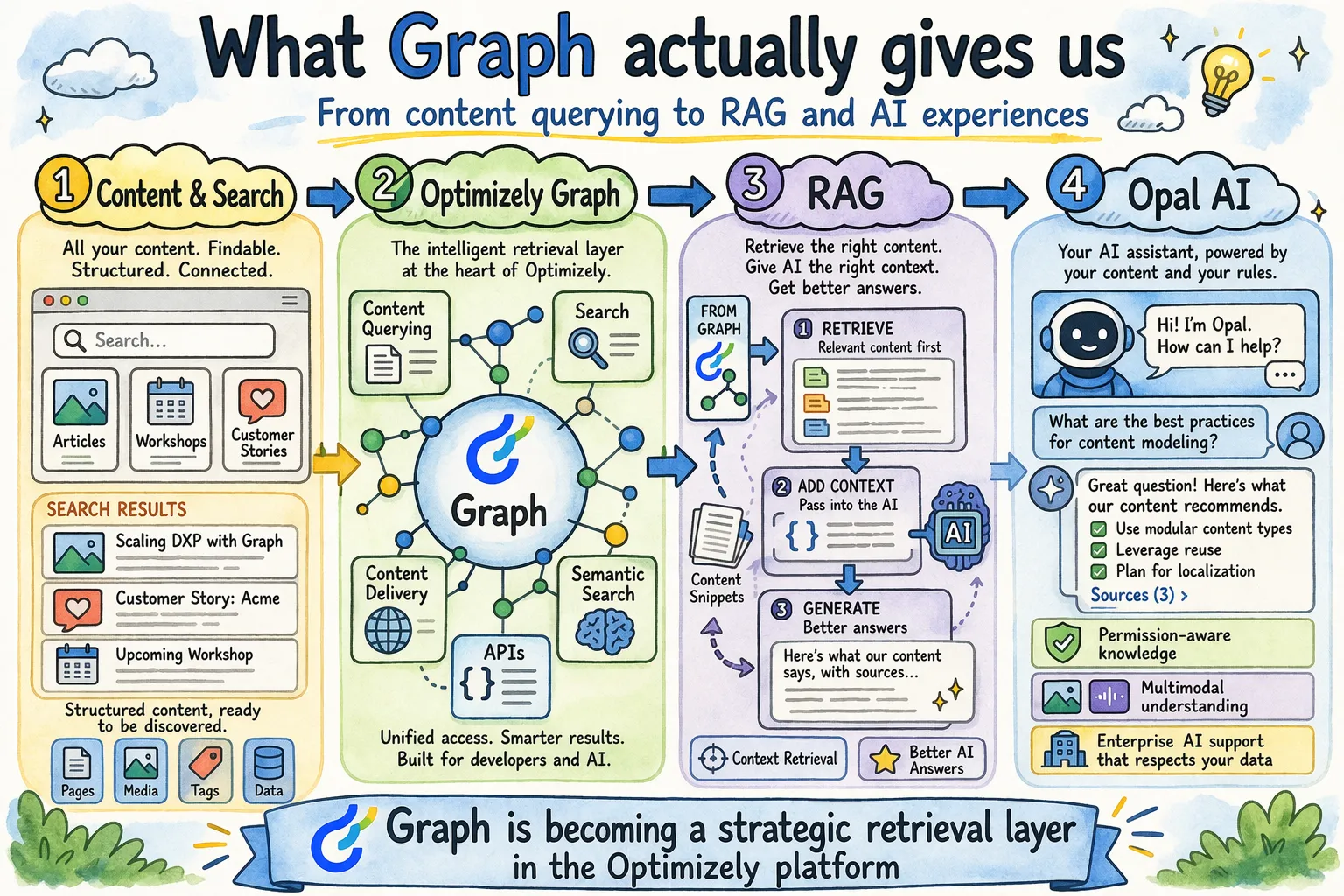
For me, the value of Graph is not only that it replaces an older search model. It gives Optimizely one shared layer for querying content, content delivery, and semantic search on top of the same foundation.
RAG
In one sentence, RAG means Retrieval-Augmented Generation: before the AI answers, it first retrieves relevant data from a knowledge source and then uses that context to generate a more accurate response. Optimizely’s own Graph documentation explicitly says semantic search can support conversational AI by feeding it relevant results as part of a RAG approach.
Opal AI
The Optimizely support documentation is more specific here. It says Opal RAG lets Opal access, understand, and query knowledge sources so it can answer with more contextual and accurate responses. It also describes that retrieval layer as permission-aware and multimodal.
What this means
For me, the message is clear: Graph is becoming a strategic retrieval layer in the Optimizely platform, not only for search, but also for semantic and RAG-oriented scenarios.
That also tells us where Optimizely is heading. The platform is moving toward a model where content querying, search, content delivery, and AI context retrieval sit closer together instead of living in separate products and patterns. The overall direction is clear: Graph is becoming an increasingly important part of Optimizely’s AI foundation.
Final takeaway
If you are moving to Optimizely CMS 13, treat Search & Navigation to Graph migration as a real workstream, not a side note in the upgrade checklist.
The new Graph SDK makes simple scenarios look familiar, which is good. At the same time, Graph in Optimizely opens the door to a more modern kind of platform where querying, search, content delivery, and AI context retrieval are much more closely connected.
That is why my impression is very positive here. I genuinely think Optimizely chose the right direction, and probably the only direction that really makes sense if you want the platform to stay aligned with where modern technology is going.
If you have questions or you want to compare migration patterns from a real project, leave a comment. Regards, Wojtek
Sources
- 2026 Optimizely CMS 13 (PaaS) release notes
- Migrate Search & Navigation to Optimizely Graph
- Feature migration
- Introducing the Optimizely CMS 13 Graph SDK
- Semantic search in Optimizely Graph
- Optimizely Opal
- Retrieval-Augmented Generation (RAG) overview
- System tools overview
- System tools for Optimizely Graph